This is the procedure I used to move a production billing database from a single server onto a Postgres HA cluster on Hetzner Cloud, written as steps you can follow. Every configuration file below is the one running in production today, with names and secrets replaced and a few tuning parameters trimmed for length. The cluster has been through ten real leader changes since it went live.
Automated version: hetzner-postgres-ha builds this cluster on Hetzner Cloud with one command (
make up, Terraform and Ansible) and ships drills 2 and 8 below asmake failover-testandmake restore-test. It uses three identical nodes instead of two plus an etcd witness and current versions (PostgreSQL 18, etcd 3.6); the design is the one described here.
Stack: PostgreSQL 16.15, Patroni 4.1.5, etcd 3.4.30, PgBouncer 1.25.2, pgBackRest 2.59.1, Ubuntu 24.04, Hetzner Cloud servers, Volumes, Object Storage and a Load Balancer.
What you get Link to heading
| Property | Before (one server) | After (this cluster) |
|---|---|---|
| Server failure | Manual restore from last night’s snapshot; up to 24 h of data lost | Automatic failover in about 40 s; zero committed transactions lost |
Bad DELETE at 14:32:07 | Restore the whole machine to last night | Point-in-time restore to 14:32:00, any second in the last 14 days |
| OS patching | Restarts the database | Planned switchover (~10 s), patch the replica, switch back |
| Connections | Every app pod opens as many as it likes | PgBouncer caps them; Postgres sees at most 80 per database |
| Storage | Fixed root disk | Volumes grown online, no downtime |
How the HA works Link to heading
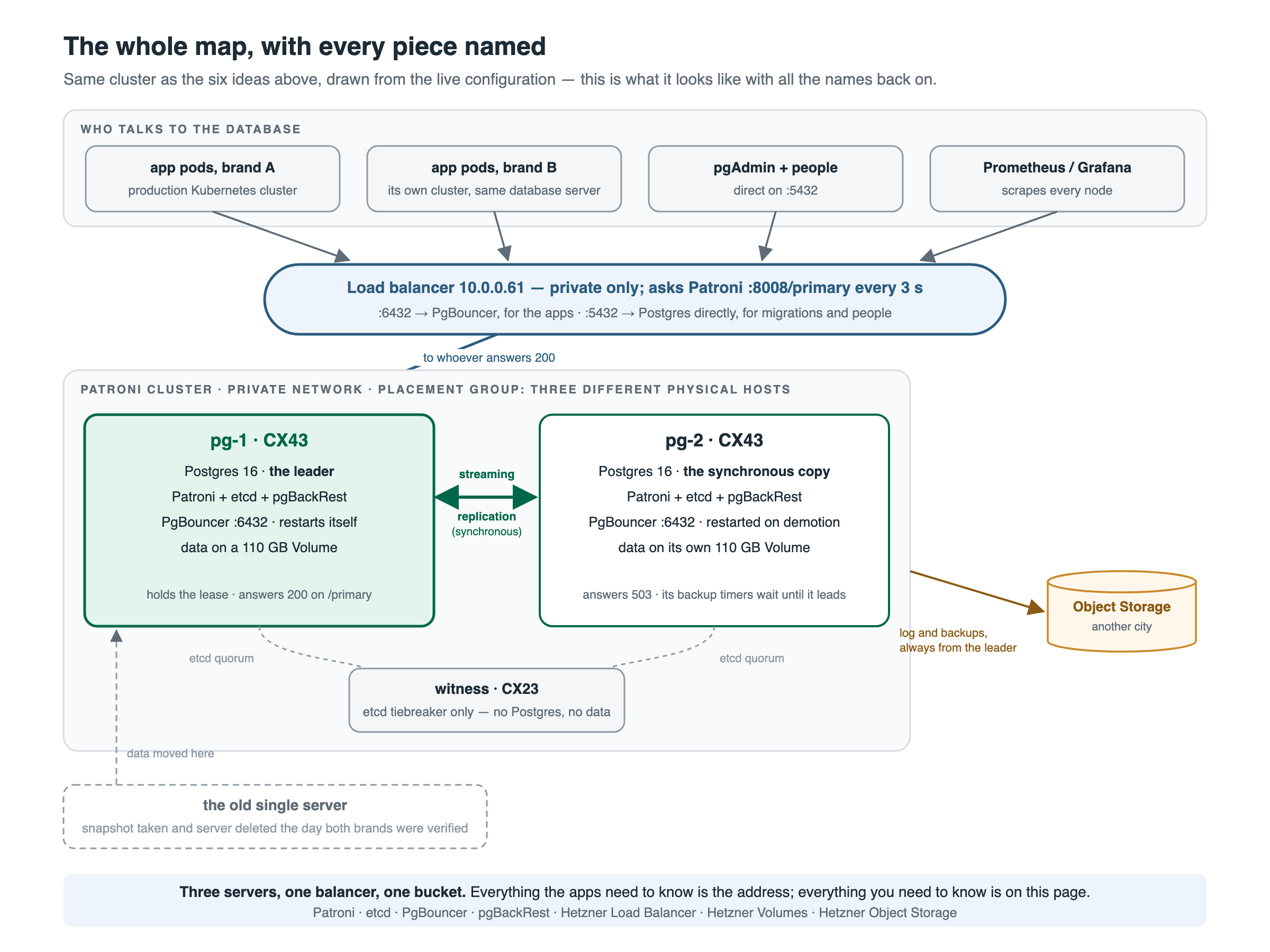
Four mechanisms, each independent of the others:
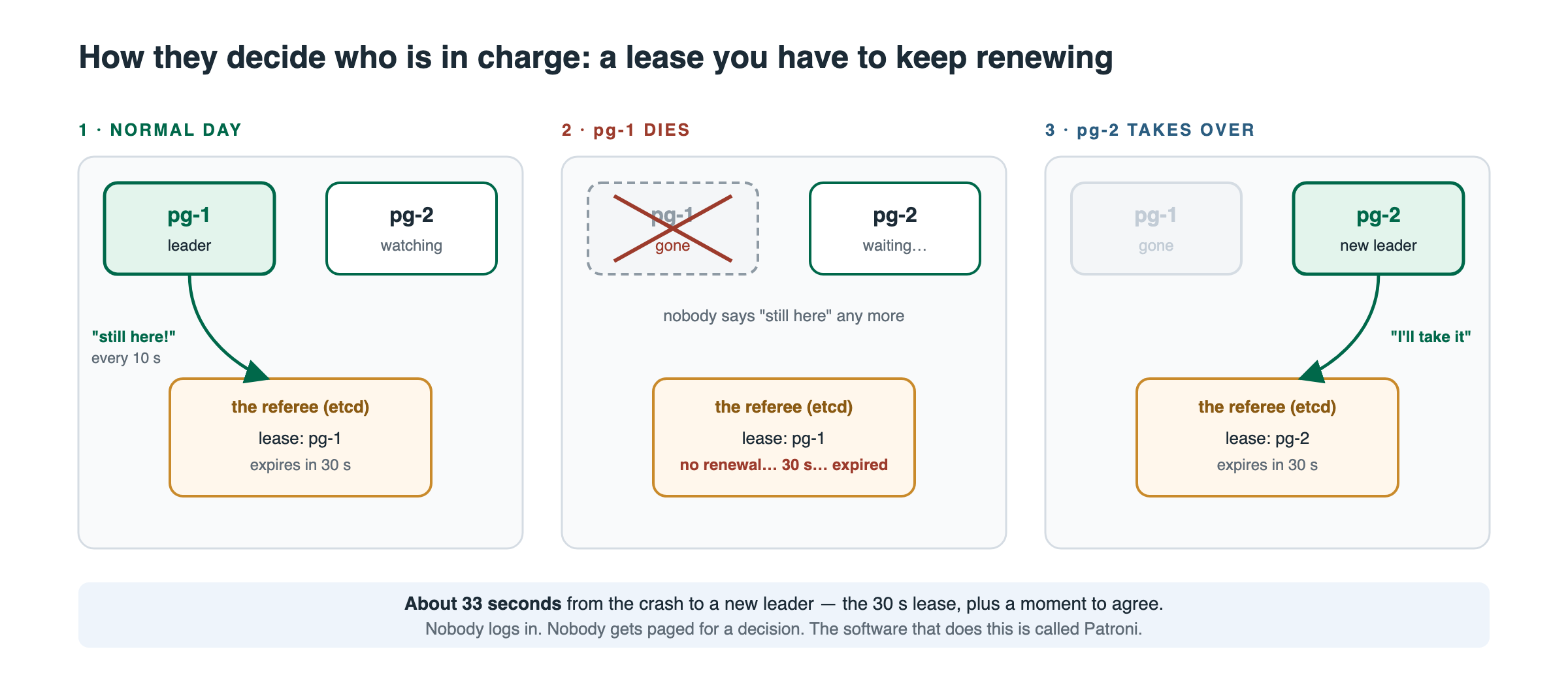
1. Leader election by lease. Patroni on each node talks to a three-member etcd cluster (pg-1, pg-2 and a small witness). The leader holds a key in etcd with a 30-second TTL and renews it every 10 seconds. If the leader stops renewing, the key expires and the replica promotes itself. Three etcd members mean the two Postgres nodes can never disagree about who leads: whoever still has quorum wins, the other steps down. Lose two etcd members and the surviving Postgres node cannot hold the lock, so it demotes itself rather than risk two writers.
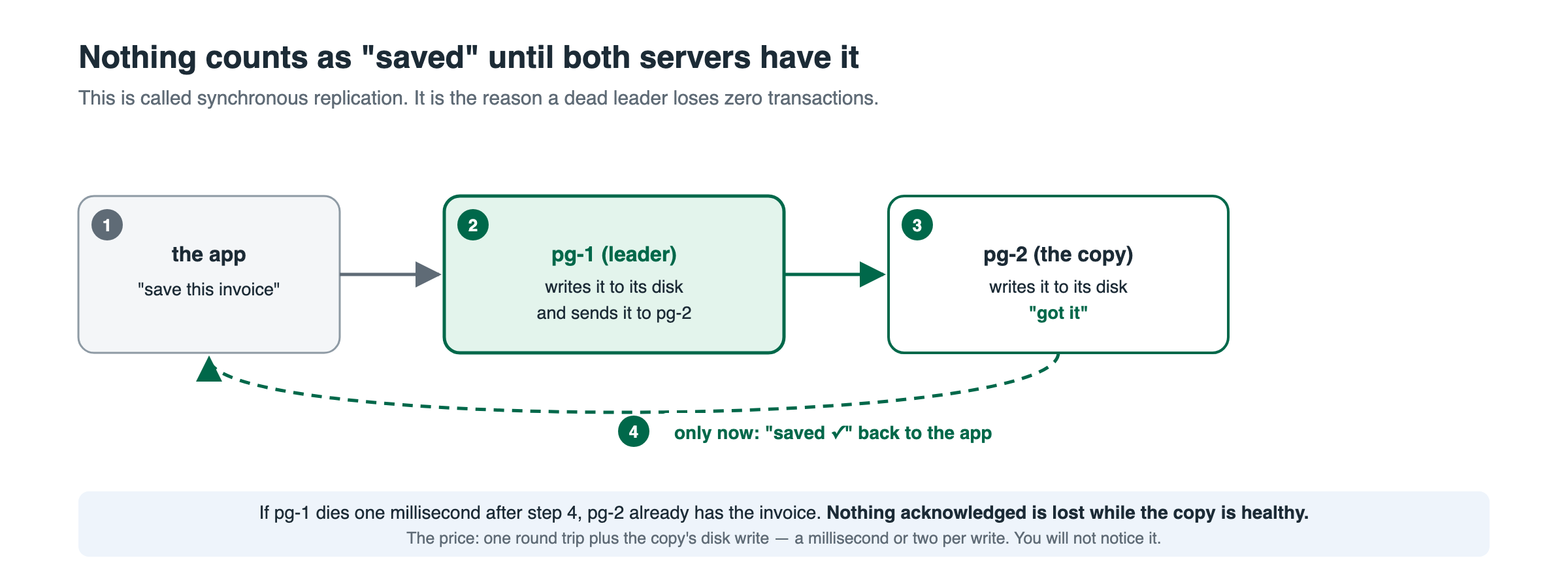
2. Synchronous replication. The leader does not acknowledge a commit until the replica has written it to its own WAL. While the replica is healthy the recovery point objective is zero. If the replica disappears, Patroni switches the leader to standalone after the TTL (synchronous_mode_strict: off) so writes continue, and an alert fires.
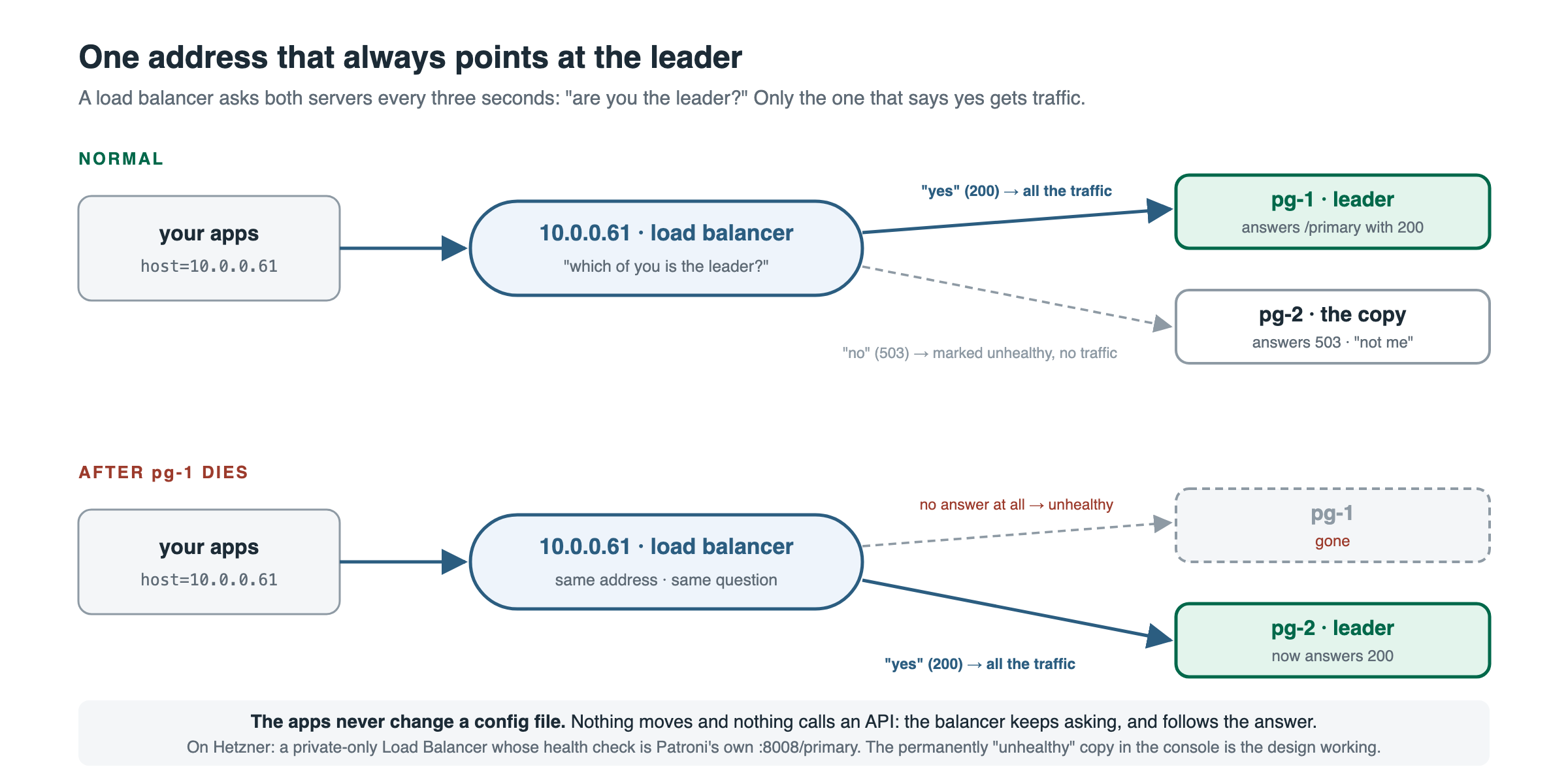
3. Routing by health check. A private Hetzner Load Balancer at 10.0.0.61 forwards ports 5432 and 6432 to both nodes, but its health check is GET :8008/primary on Patroni’s REST API every 3 seconds. The leader answers 200, the replica answers 503, so exactly one target is ever healthy. Nothing moves, nothing calls a cloud API during failover; the balancer simply follows Patroni’s own answer. The console shows the balancer as “mixed” health permanently. That is correct.
4. Fencing. Patroni arms the kernel software watchdog when it holds the leader lock. With ttl: 30 and safety_margin: 5, a leader whose Patroni process hangs for 25 seconds is hard-reset before its lease can expire under it, so a hung node cannot linger as a second writer.
Failover timeline when the leader dies, measured:
| Time | Event |
|---|---|
| 0 s | Leader stops renewing its lease |
| 30 s | Lease expires in etcd |
| ~33 s | Replica promotes, new timeline |
| ~36–39 s | Load balancer health check sees 200 on the new leader (3 s interval, 2 retries) |
| ~40 s | Apps with connect_timeout=10 are writing again |
| 68 s | An app without connect_timeout (exponential retry fell past the switch) |
A planned switchover is about 10 seconds, plus a PgBouncer restart on the demoted node (Step 7 explains why).
Prerequisites Link to heading
| Item | What I used |
|---|---|
| Two database servers | CX43 (8 vCPU, 16 GB), Ubuntu 24.04, pg-1 10.0.0.20 and pg-2 10.0.0.21 |
| One witness | CX23 (2 vCPU, 4 GB), pg-witness 10.0.0.22. Runs etcd only |
| Private network | 10.0.0.0/24, all three servers attached |
| Placement group | Type spread, all three servers. Guarantees three different physical hosts |
| Two Volumes | 100 GB each, one per database server, for PGDATA |
| Object Storage bucket | In a different region from the servers (servers in hel1, bucket in fsn1) |
| Load balancer | LB11, private network only, no public IP |
| Cloud firewall | Public interface: tcp/22 from your admin IPs and ICMP only. Nothing else |
Everything below runs as root unless stated. Replace <...> placeholders. I use pg-ha as the Patroni scope, appdb as the database and appuser as its owner.
Step 1: Prepare every node Link to heading
Turn off unattended upgrades first. On a database node, patching is a planned switchover, never a 6 a.m. surprise.
systemctl disable --now apt-daily-upgrade.timer apt-daily.timer
printf 'APT::Periodic::Update-Package-Lists "0";\nAPT::Periodic::Unattended-Upgrade "0";\n' \
  > /etc/apt/apt.conf.d/20auto-upgrades
Private network interface via netplan (Hetzner hands out the address by DHCP):
# /etc/netplan/60-private-net.yaml  (chmod 600)
network:
  version: 2
  ethernets:
    enp7s0:
      match: {macaddress: "<mac of the private NIC>"}
      set-name: enp7s0
      dhcp4: true
      dhcp4-overrides: {use-routes: true}
netplan generate && netplan apply
ip route | grep -q '10.0.0.0/16' || ip route add 10.0.0.0/16 via 10.0.0.1 dev enp7s0
Host firewall. Cluster ports only from the private network:
ufw default deny incoming; ufw default allow outgoing
ufw allow 22/tcp
for p in 2379 2380 9100; do ufw allow from 10.0.0.0/24 to any port $p proto tcp; done
# database nodes only:
for p in 5432 6432 8008 9187; do ufw allow from 10.0.0.0/24 to any port $p proto tcp; done
ufw --force enable
Add the PGDG repository so you get current PostgreSQL, Patroni, PgBouncer and pgBackRest:
install -d /usr/share/postgresql-common/pgdg
curl -fsSL https://www.postgresql.org/media/keys/ACCC4CF8.asc \
  -o /usr/share/postgresql-common/pgdg/apt.postgresql.org.asc
echo "deb [signed-by=/usr/share/postgresql-common/pgdg/apt.postgresql.org.asc] https://apt.postgresql.org/pub/repos/apt noble-pgdg main" \
  > /etc/apt/sources.list.d/pgdg.list
apt-get update
Step 2: etcd on all three nodes Link to heading
etcd is the distributed lock. It lives on the local disk of all three nodes, not on the Volume.
apt-get install -y etcd-server etcd-client
systemctl stop etcd; rm -rf /var/lib/etcd/default
# /etc/default/etcd  (per node: NAME and IP change, the rest is identical)
ETCD_NAME=pg-1
ETCD_DATA_DIR=/var/lib/etcd/default
ETCD_LISTEN_PEER_URLS=http://10.0.0.20:2380
ETCD_LISTEN_CLIENT_URLS=http://10.0.0.20:2379,http://127.0.0.1:2379
ETCD_INITIAL_ADVERTISE_PEER_URLS=http://10.0.0.20:2380
ETCD_ADVERTISE_CLIENT_URLS=http://10.0.0.20:2379
ETCD_INITIAL_CLUSTER=pg-1=http://10.0.0.20:2380,pg-2=http://10.0.0.21:2380,pg-witness=http://10.0.0.22:2380
ETCD_INITIAL_CLUSTER_STATE=new
ETCD_INITIAL_CLUSTER_TOKEN=<random string, same on all three>
ETCD_ENABLE_V2=false
ETCD_AUTO_COMPACTION_RETENTION=1
systemctl enable --now etcd
ETCDCTL_API=3 etcdctl --endpoints=http://10.0.0.20:2379,http://10.0.0.21:2379,http://10.0.0.22:2379 \
  endpoint status -w table
All three must show up, one of them IS LEADER. That etcd leader has nothing to do with the Postgres leader; they are separate elections and will often be on different nodes.
The witness is finished at this point. Everything from here on is for pg-1 and pg-2 only.
Step 3: The data Volume, with a guard Link to heading
PGDATA lives on a Hetzner Volume so it can be grown online and survives a server rebuild. Mount it by ID with nofail, then add the one line that stops Postgres from ever starting without it.
DEV=/dev/disk/by-id/scsi-0HC_Volume_<volume id>
blkid "$DEV" | grep -q ext4 || mkfs.ext4 -L pgdata "$DEV"
mkdir -p /var/lib/postgresql
echo "$DEV  /var/lib/postgresql  ext4  discard,noatime,nofail,defaults  0 0" >> /etc/fstab
systemctl daemon-reload; mount -a; findmnt /var/lib/postgresql

install -d /etc/systemd/system/patroni.service.d
printf '[Unit]\nRequiresMountsFor=/var/lib/postgresql\n' \
  > /etc/systemd/system/patroni.service.d/require-data-volume.conf
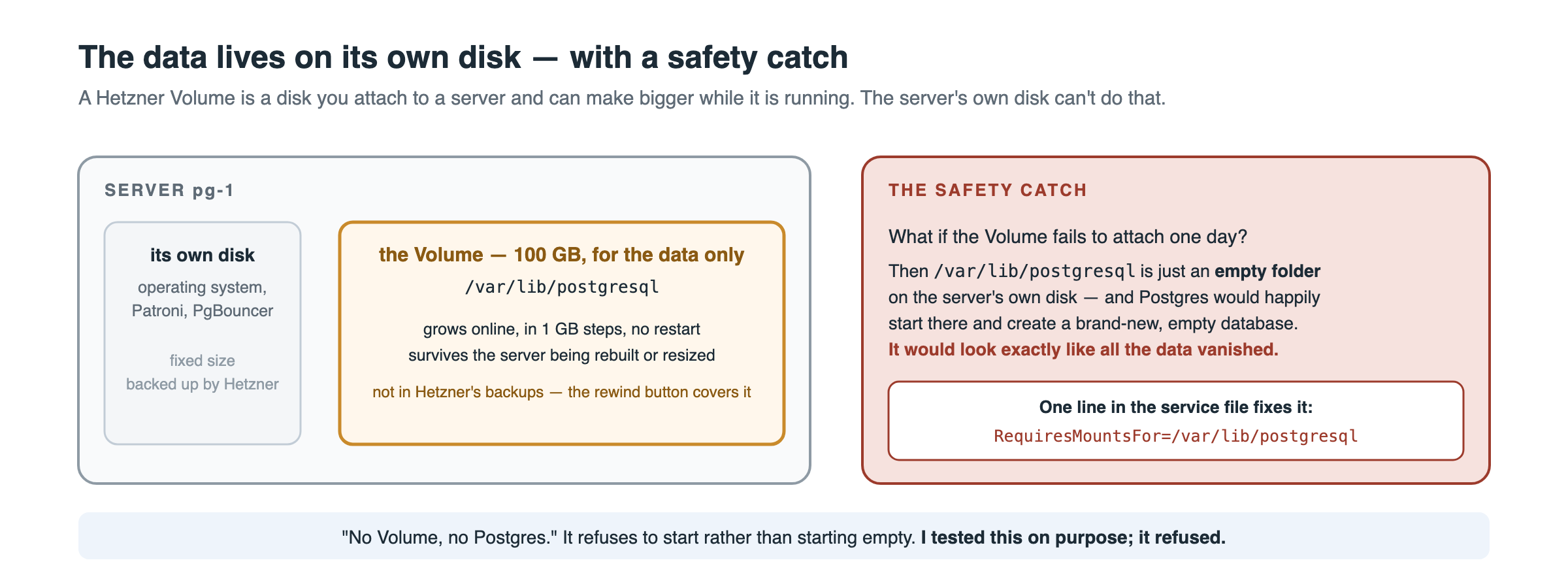
Without RequiresMountsFor, a Volume that fails to attach leaves an empty directory on the root disk, Patroni initialises a fresh empty cluster there, and it looks exactly like all your data vanished. Drill 10 below proves the guard works.
Step 4: Install Postgres, Patroni, PgBouncer, pgBackRest Link to heading
apt-get install -y postgresql-16 postgresql-client-16 postgresql-contrib \
  patroni pgbouncer pgbackrest prometheus-postgres-exporter
chown postgres:postgres /var/lib/postgresql

# Debian auto-creates a cluster on the root disk. Patroni owns the data directory instead.
pg_dropcluster --stop 16 main
systemctl disable --now postgresql pgbouncer prometheus-postgres-exporter
rm -rf /var/lib/postgresql/16/main
install -d -o postgres -g postgres -m 700 /var/lib/postgresql/16
Watchdog. Two things Ubuntu gets in the way of: the kernel package blacklists softdog, so /etc/modules-load.d is refused, and the device is root:root, so Patroni (running as postgres) cannot arm it and silently continues without fencing.
# /etc/systemd/system/softdog-load.service
[Unit]
Description=Load softdog for the Patroni watchdog
DefaultDependencies=no
Before=patroni.service sysinit.target
[Service]
Type=oneshot
RemainAfterExit=yes
ExecStart=/sbin/modprobe softdog
[Install]
WantedBy=sysinit.target
echo 'KERNEL=="watchdog", OWNER="postgres", MODE="0600"' > /etc/udev/rules.d/60-watchdog.rules
systemctl daemon-reload; systemctl enable --now softdog-load.service
udevadm control --reload-rules; udevadm trigger --subsystem-match=misc --action=add
ls -l /dev/watchdog    # must be owned by postgres
Step 5: Patroni Link to heading
One file per node. Only name, listen and connect_address differ between pg-1 and pg-2.
# /etc/patroni/config.yml  (owner postgres, chmod 600)
scope: pg-ha
namespace: /service/
name: pg-1

restapi:
  listen: 10.0.0.20:8008
  connect_address: 10.0.0.20:8008

etcd3:
  hosts: 10.0.0.20:2379,10.0.0.21:2379,10.0.0.22:2379

bootstrap:
  dcs:
    ttl: 30
    loop_wait: 10
    retry_timeout: 10
    maximum_lag_on_failover: 1048576
    synchronous_mode: on
    synchronous_mode_strict: off
    postgresql:
      use_pg_rewind: true
      use_slots: true
      parameters:
        max_connections: 200
        shared_buffers: 4GB
        effective_cache_size: 11GB
        work_mem: 32MB
        maintenance_work_mem: 1GB
        random_page_cost: 1.1
        effective_io_concurrency: 200
        checkpoint_timeout: 15min
        max_wal_size: 8GB
        min_wal_size: 2GB
        wal_level: replica
        hot_standby: "on"
        wal_log_hints: "on"
        wal_keep_size: 1GB
        max_wal_senders: 10
        max_replication_slots: 10
        archive_mode: "on"
        archive_command: 'pgbackrest --stanza=pg-ha archive-push %p'
        archive_timeout: 300
        shared_preload_libraries: pg_stat_statements
        track_io_timing: "on"
        ssl: "on"
        password_encryption: scram-sha-256
        idle_in_transaction_session_timeout: 300000
        log_min_duration_statement: 1000
        log_line_prefix: '%m [%p] %q%u@%d '
        timezone: Etc/UTC
  initdb:
    - encoding: UTF8
    - locale: en_US.UTF-8
    - data-checksums
  pg_hba:
    - local all postgres peer
    - local all all peer
    - host all all 127.0.0.1/32 scram-sha-256
    - host replication replicator 10.0.0.20/32 scram-sha-256
    - host replication replicator 10.0.0.21/32 scram-sha-256
    - hostssl all postgres 10.0.0.0/24 scram-sha-256
    - host all prom_exporter 10.0.0.0/24 scram-sha-256
    - host appdb appuser 10.0.0.0/24 scram-sha-256
    - host appdb +appdb_ro 10.0.0.0/24 scram-sha-256

postgresql:
  listen: 0.0.0.0:5432
  connect_address: 10.0.0.20:5432
  use_unix_socket: true
  data_dir: /var/lib/postgresql/16/main
  bin_dir: /usr/lib/postgresql/16/bin
  config_dir: /var/lib/postgresql/16/main
  pgpass: /var/lib/postgresql/.pgpass_patroni
  authentication:
    superuser: {username: postgres, password: "<superuser password>"}
    replication: {username: replicator, password: "<replication password>"}
  parameters:
    unix_socket_directories: /var/run/postgresql
  create_replica_methods: [basebackup]
  basebackup: [checkpoint: fast]
  callbacks:
    on_start: /usr/local/bin/pg-role-callback
    on_role_change: /usr/local/bin/pg-role-callback

watchdog:
  mode: automatic
  device: /dev/watchdog
  safety_margin: 5
Notes on the values that matter:
ttl: 30 / loop_wait: 10 / retry_timeout: 10is Patroni’s minimum (ttl >= loop_wait + 2 * retry_timeout). It gives the 30-second failover; it also gives zero margin for an etcd hiccup. Raise all three together if your etcd is not on the same LAN.synchronous_mode: onwithstrict: offis the “RPO 0 while healthy, keep writing if the replica dies” choice.strict: onwould block all writes when the replica is gone.pg_hbalines are per database and per role. A new role cannot connect until it has a line, no matter what youGRANT. The+appdb_roform names a group, so people you add later need only aGRANT.- Give Patroni its own
pgpassfile. It rewrites whatever file you point it at, and it will eat the postgres user’s~/.pgpass. - The
callbackspoint at a script installed in Step 7. Create it before starting Patroni, or leave the two lines out until then.
Bring the cluster up: pg-1 first, wait for the bootstrap, then pg-2, which clones itself from pg-1 with pg_basebackup.
systemctl enable --now patroni                 # on pg-1
journalctl -fu patroni                          # wait for "initialized a new cluster"
systemctl enable --now patroni                 # on pg-2
patronictl -c /etc/patroni/config.yml list
+ Cluster: pg-ha -----+--------------+-----------+----+-----------+
| Member | Host       | Role         | State     | TL | Lag in MB |
+--------+------------+--------------+-----------+----+-----------+
| pg-1   | 10.0.0.20  | Leader       | running   |  1 |           |
| pg-2   | 10.0.0.21  | Sync Standby | streaming |  1 |         0 |
+--------+------------+--------------+-----------+----+-----------+
Patroni 4 does not create application users from bootstrap.users the way older tutorials show. Create them on the leader after bootstrap:
CREATE ROLE appuser LOGIN PASSWORD '<password>';
CREATE DATABASE appdb OWNER appuser;
CREATE ROLE prom_exporter LOGIN PASSWORD '<password>' IN ROLE pg_monitor;
Verify the watchdog is armed on the leader. The log line alone can be stale; the open file descriptor is the proof:
ls -l /proc/$(systemctl show patroni -p MainPID --value)/fd | grep watchdog
Step 6: PgBouncer on both nodes Link to heading
PgBouncer runs on both nodes and always forwards to its own Postgres on 127.0.0.1, so it follows the role without any configuration change.
# /etc/pgbouncer/pgbouncer.ini
[databases]
appdb = host=127.0.0.1 port=5432 dbname=appdb

[pgbouncer]
listen_addr = *
listen_port = 6432
unix_socket_dir = /var/run/postgresql
pool_mode = transaction
max_client_conn = 500
max_db_connections = 80
default_pool_size = 20
min_pool_size = 5
reserve_pool_size = 5
reserve_pool_timeout = 3
max_prepared_statements = 200
query_wait_timeout = 15
server_lifetime = 3600
server_idle_timeout = 600
ignore_startup_parameters = extra_float_digits,options
auth_type = scram-sha-256
auth_file = /etc/pgbouncer/userlist.txt
admin_users = postgres
stats_users = prom_exporter
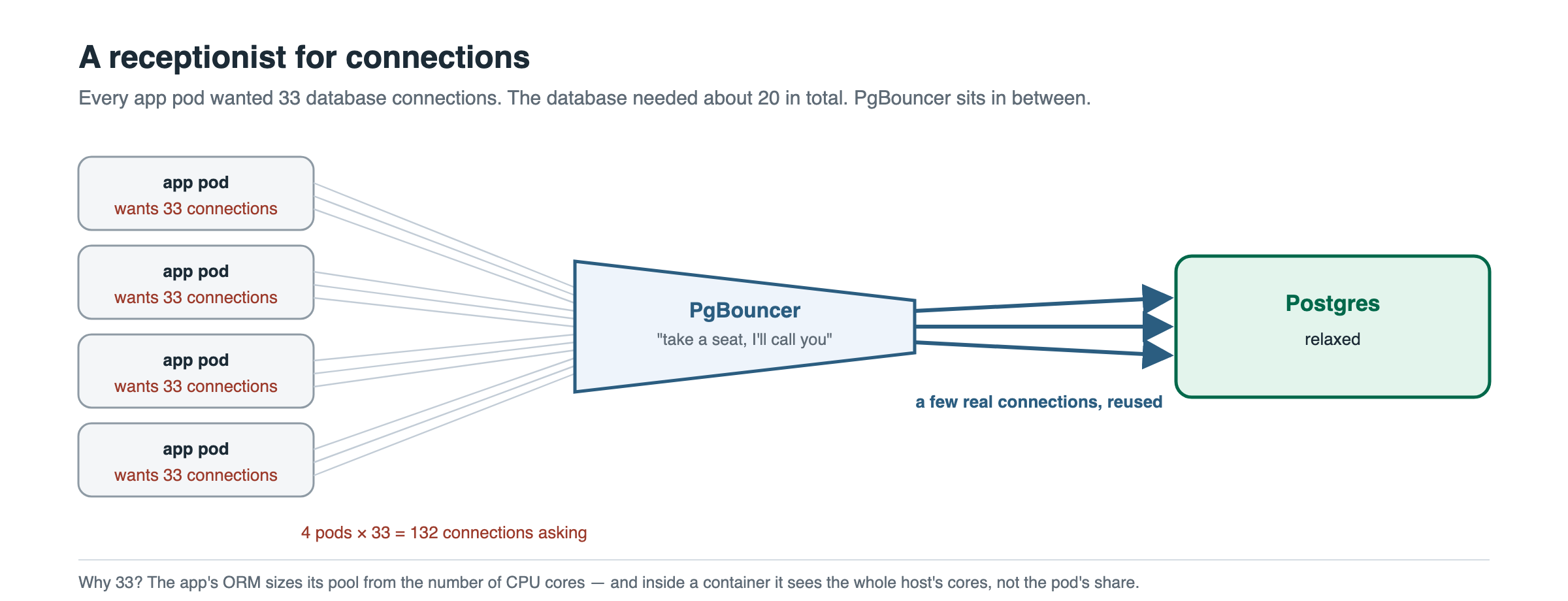
max_db_connections = 80is the cap that matters. Pools are per (user, database); without it, six users could ask for 300 server connections againstmax_connections = 200.max_prepared_statements = 200(PgBouncer ≥ 1.21) is what lets Prisma and other prepared-statement clients work in transaction mode without?pgbouncer=true.- Transaction mode is safe only if the app does not rely on session state across transactions: no
LISTEN/NOTIFY, no session-level advisory locks, noSEToutside a transaction. Grep your code before you choose it.
userlist.txt holds the SCRAM verifiers, copied from Postgres. It must be identical on both nodes, and it is static: when you rotate a password, update both files or authentication breaks.
sudo -u postgres psql -Atc "select '\"'||rolname||'\" \"'||rolpassword||'\"' from pg_authid where rolname in ('appuser','prom_exporter')" \
  > /etc/pgbouncer/userlist.txt
chown postgres:postgres /etc/pgbouncer/userlist.txt; chmod 600 /etc/pgbouncer/userlist.txt
Debian ships PgBouncer with Restart=no. Since the load balancer health-checks Patroni and not PgBouncer, a dead pooler on the leader means every client is refused while everything reports healthy. Fix that before it happens:
# /etc/systemd/system/pgbouncer.service.d/10-restart.conf
[Unit]
StartLimitIntervalSec=0
[Service]
Restart=always
RestartSec=2
LimitNOFILE=65536
systemctl daemon-reload; systemctl enable --now pgbouncer
kill -9 $(pidof pgbouncer); sleep 3; systemctl is-active pgbouncer   # must print: active
Step 7: Restart PgBouncer on demotion Link to heading
This step exists because of the one production incident this design had. A TCP load balancer decides where new connections go; it never closes the ones already open. After a planned switchover, the app pods kept their pooled connections to the old leader, which was now a read-only replica. Reads worked. Every write failed with cannot execute UPDATE in a read-only transaction.
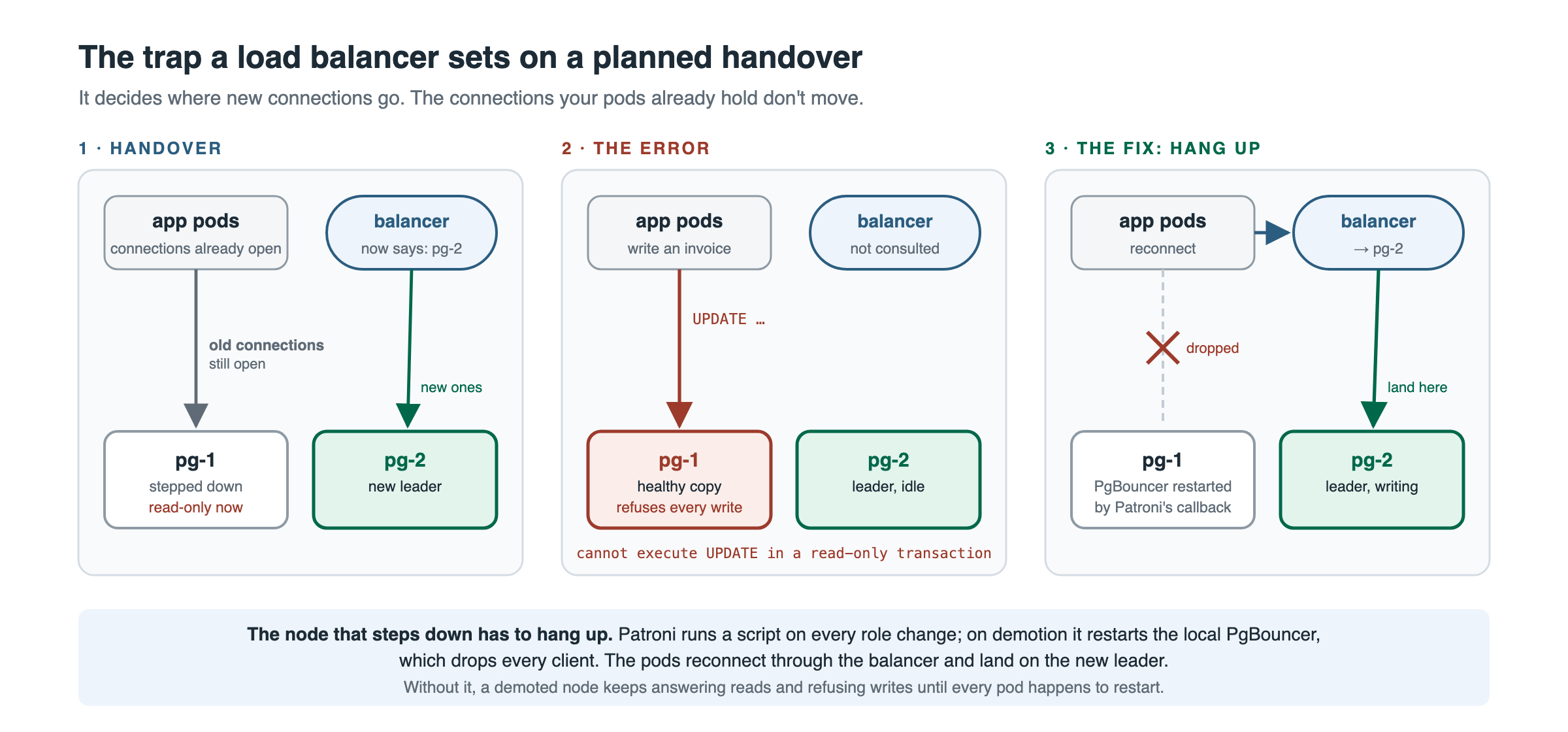
The demoted node has to hang up on its clients. Patroni’s on_role_change callback runs as postgres, which cannot restart a service, so the callback only writes a marker and a root-owned path unit does the work.
# /usr/local/bin/pg-role-callback   (chmod 755) -- Patroni calls it: <action> <role> <scope>
#!/bin/bash
ACTION=$1; ROLE=$2
case "$ACTION" in on_role_change|on_start) ;; *) exit 0 ;; esac
printf '%s\n' "$ROLE" > /var/lib/postgresql/pg-role-target
exit 0
# /usr/local/bin/pg-role-apply   (chmod 755) -- runs as root
#!/bin/bash
LOG=/var/log/pg-role-callback.log
r=$(tr -cd 'a-z_' < /var/lib/postgresql/pg-role-target)
case "$r" in
  replica|standby_leader) systemctl restart pgbouncer && echo "$(date -u '+%F %T') demoted -> restarted pgbouncer" >> "$LOG" ;;
  master|primary)         systemctl is-active --quiet pgbouncer || systemctl start pgbouncer ;;
esac
# /etc/systemd/system/pg-role-watch.path
[Unit]
Description=Watch Patroni role marker and reconcile PgBouncer
[Path]
PathModified=/var/lib/postgresql/pg-role-target
Unit=pg-role-watch.service
[Install]
WantedBy=multi-user.target

# /etc/systemd/system/pg-role-watch.service
[Unit]
Description=Reconcile PgBouncer with the current Patroni role
[Service]
Type=oneshot
ExecStart=/usr/local/bin/pg-role-apply
touch /var/lib/postgresql/pg-role-target; chown postgres:postgres /var/lib/postgresql/pg-role-target
systemctl daemon-reload; systemctl enable --now pg-role-watch.path
patronictl -c /etc/patroni/config.yml reload pg-ha $(hostname)    # picks up the callbacks: lines
After every switchover, /var/log/pg-role-callback.log on the demoted node should have a new demoted -> restarted pgbouncer line. That log is the proof the mechanism fired.
Step 8: The load balancer Link to heading
Create it through the API with the health check on Patroni’s /primary. Order matters: create without a network and without targets, attach to the network with a fixed IP, then add the targets. Detaching from a network silently drops every private-IP target.
API=https://api.hetzner.cloud/v1; H="Authorization: Bearer $HCLOUD_TOKEN"
HC='"health_check":{"protocol":"http","port":8008,"interval":3,"timeout":2,"retries":2,"http":{"path":"/primary","status_codes":["200"],"tls":false}}'

# 1. create: private only, two TCP services, same health check on both
LB=$(curl -s -H "$H" -X POST "$API/load_balancers" -d "{\"name\":\"pg-lb\",\"load_balancer_type\":\"lb11\",\"location\":\"hel1\",
  \"algorithm\":{\"type\":\"round_robin\"},\"public_interface\":false,
  \"services\":[{\"protocol\":\"tcp\",\"listen_port\":5432,\"destination_port\":5432,\"proxyprotocol\":false,$HC},
                {\"protocol\":\"tcp\",\"listen_port\":6432,\"destination_port\":6432,\"proxyprotocol\":false,$HC}]}" \
  | python3 -c 'import json,sys; print(json.load(sys.stdin)["load_balancer"]["id"])')

# 2. attach to the private network with a fixed address
curl -s -H "$H" -X POST "$API/load_balancers/$LB/actions/attach_to_network" -d '{"network":<network id>,"ip":"10.0.0.61"}'
sleep 12

# 3. targets by private IP
for S in <pg-1 server id> <pg-2 server id>; do
  curl -s -H "$H" -X POST "$API/load_balancers/$LB/actions/add_target" -d "{\"type\":\"server\",\"server\":{\"id\":$S},\"use_private_ip\":true}"
done
Wait a minute, then check the targets: the leader must be healthy on both ports and the replica unhealthy on both. That is the steady state. Do not “fix” it, and do not point the health check at port 6432: only /primary enforces leader-only routing.
Clients then use:
10.0.0.61:6432for applications, through PgBouncer.10.0.0.61:5432for schema migrations, pgAdmin and people, directly to Postgres. Migrations cannot go through a transaction-mode pooler.
The balancer sees connections from its own private address, so the 10.0.0.0/24 lines in pg_hba cover it.
Step 9: Backups and point-in-time recovery Link to heading
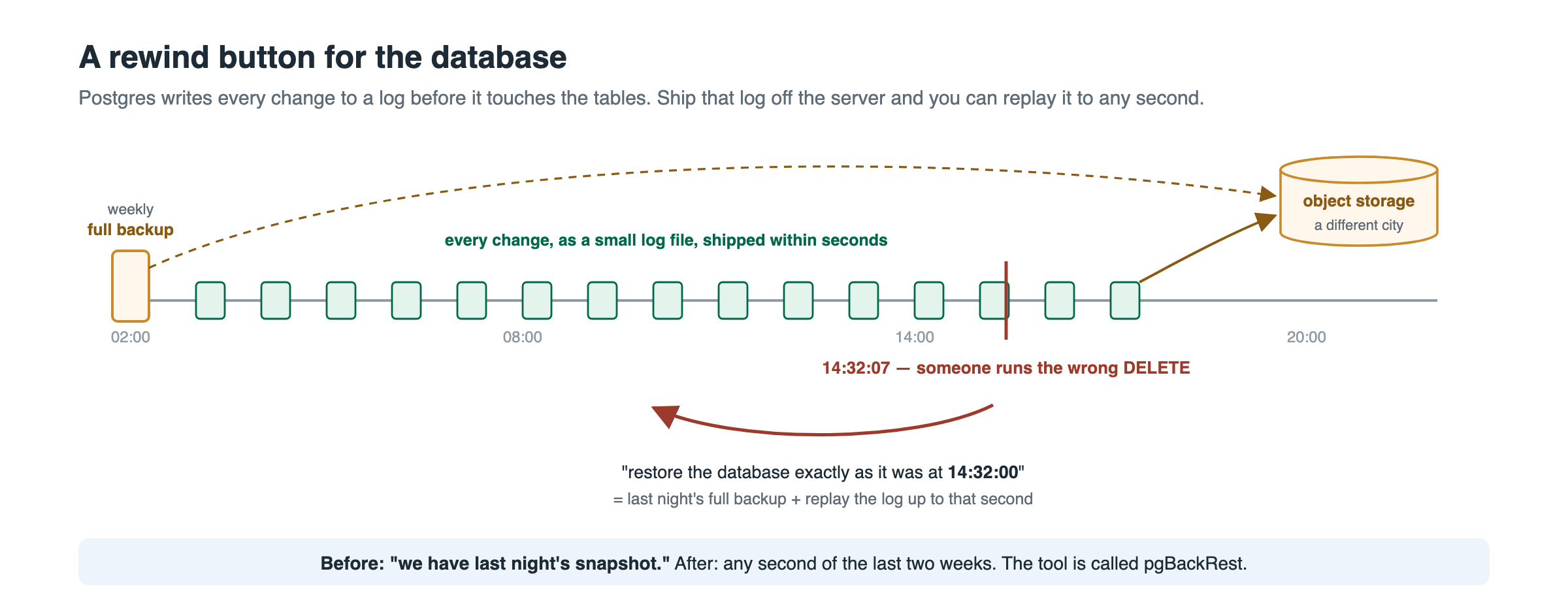
pgBackRest ships every WAL segment to object storage as it is written, plus a weekly full and daily differential backup. With that you can restore to any second in the retention window.
# /etc/pgbackrest/pgbackrest.conf  (identical on both nodes)
[global]
repo1-type=s3
repo1-path=/pgbackrest
repo1-s3-bucket=<bucket>
repo1-s3-endpoint=fsn1.your-objectstorage.com
repo1-s3-region=fsn1
repo1-s3-uri-style=path
repo1-s3-key=<access key>
repo1-s3-key-secret=<secret key>
repo1-retention-full=2
repo1-retention-diff=14
process-max=2
compress-type=zst
start-fast=y
archive-async=y
spool-path=/var/spool/pgbackrest
log-level-console=info
log-level-file=detail
log-path=/var/log/pgbackrest

[pg-ha]
pg1-path=/var/lib/postgresql/16/main
pg1-port=5432
pg1-socket-path=/var/run/postgresql
repo1-s3-uri-style=path is mandatory for Hetzner Object Storage; without it you get an unhelpful error. archive_command is already set in the Patroni DCS config (Step 5), so it follows whichever node is primary.
sudo -u postgres pgbackrest --stanza=pg-ha stanza-create
sudo -u postgres pgbackrest --stanza=pg-ha check          # on the leader; on the replica this command reports "primary not found", which is expected
sudo -u postgres pgbackrest --stanza=pg-ha --type=full backup
sudo -u postgres pgbackrest --stanza=pg-ha info
Schedule it with a systemd timer on both nodes. The script runs only where Patroni reports primary, and it asks this node’s REST address, not localhost, because Patroni’s REST API listens on the private address only. (My first version asked localhost, got “connection refused”, concluded “not primary” and exited 0 every night without doing anything.)
# /usr/local/bin/pgbackrest-backup.sh  -- Sunday full, other days differential
#!/bin/bash
MYIP=$(ip -4 -o addr show enp7s0 | awk '{print $4}' | cut -d/ -f1)
[ "$(curl -s -o /dev/null -w '%{http_code}' --max-time 5 http://$MYIP:8008/primary)" = 200 ] || exit 0
TYPE=diff; [ "$(date -u +%u)" = 7 ] && TYPE=full
sudo -u postgres pgbackrest --stanza=pg-ha --type=$TYPE backup >> /var/log/pgbackrest/backup-timer.log 2>&1
I also keep a nightly pg_dump -Fc of each database plus pg_dumpall --globals-only in the same bucket, gated the same way. A logical dump restores one table in minutes; pgBackRest restores a cluster to a second. Different tools, different questions.
Point-in-time restore, on a scratch server with the same config (never on a cluster node):
sudo -u postgres pgbackrest --stanza=pg-ha --type=time --target="2026-09-05 14:32:00+00" \
  --target-action=promote --delta restore
Then start Postgres and check the row that should exist and the one that should not. Do this once a month; a backup nobody has restored is a hope.
Step 10: Monitoring Link to heading
What to scrape, per node:
| Endpoint | What it gives |
|---|---|
:8008/metrics | Patroni: role, timeline, lag, DCS state |
:8008/primary (blackbox HTTP probe) | Exactly one node must answer 200. Alert if the sum is 0 or 2 |
:6432 (blackbox TCP probe) | PgBouncer alive on both nodes, regardless of role |
:9187 | postgres_exporter: connections, replication lag, slots |
:9100 | node_exporter, plus textfile metrics written by the backup timers |
:2379/metrics | etcd: etcd_server_has_leader, leader changes |
One postgres_exporter fix: the built-in pg_replication_slots query calls pg_current_wal_lsn(), which errors on a standby and pins the exporter’s error flag on whichever node is the replica. Override it with --extend.query-path and a version that uses pg_last_wal_receive_lsn() when pg_is_in_recovery().
Alerts that exist on this cluster and what each protects:
PatroniLeaderMissing(no leader for 2 min),PatroniSyncLost(running without a synchronous replica for 5 min),PgReplicationLagHigh.PgLeaderRoutingBroken: the count of nodes answering 200 on/primaryis not exactly 1.PgBouncerDown: fewer than two poolers answer on 6432.PgWalArchiveFailing:pg_stat_archiverfailures increasing. A brokenarchive_commandis a silent loss of point-in-time recovery.PgBackrestBackupStale: no successful pgBackRest backup in 36 h.PgBackupStale: no successful logical dump in 26 h. Both have aMetricMissingtwin, because a timer that never runs writes no metric at all.PgDataVolumeAbsent:/var/lib/postgresqlis not a mount point.EtcdQuorumLost,EtcdNoLeader,EtcdLeaderFlapping.
The nodes also ship their journals (Patroni, Postgres, etcd) and the PgBouncer and pgBackRest log files to Loki with Grafana Alloy, so the log line behind any alert is next to the graph.
Step 11: Break it before it holds data Link to heading
Run every one of these on the empty cluster and write down the seconds. The numbers below are mine.
| # | Drill | Command | Expected | Measured |
|---|---|---|---|---|
| 1 | Patroni process crash | kill -9 $(pidof patroni) on the leader | systemd restarts it, lease kept, no failover | 3 s blip, no role change |
| 2 | Leader server dies | Hetzner API poweroff on pg-1 | pg-2 promotes after TTL, balancer follows | New leader 33 s, apps writing at ~40 s |
| 3 | Planned switchover | patronictl switchover pg-ha | New leader, old one rejoins as replica, PgBouncer restarted on it | ~10 s, callback log line present |
| 4 | Witness down | systemctl stop etcd on pg-witness | Nothing; 2 of 3 is quorum | No change |
| 5 | Witness down and the leader dies | stop etcd on witness, poweroff pg-1 | pg-2 must not promote: one etcd member is no quorum | Correctly refused; cluster read-only until a second member returned |
| 6 | Replica killed under writes | poweroff pg-2 during pgbench | Writes pause; after the TTL the leader continues standalone | Paused, resumed when pg-2 returned; when left down, PatroniSyncLost fired at 5 min |
| 7 | Full and differential backup | pgbackrest backup --type=full then --type=diff | Both listed in pgbackrest info | OK |
| 8 | Point-in-time restore | restore --type=time to a chosen second | Row inserted before the target exists, row after does not | OK |
| 9 | Rebuild the replica | patronictl reinit pg-ha pg-2 | Re-cloned from the leader, streaming | OK |
| 10 | Volume missing | detach the Volume, reboot pg-2 | Patroni refuses to start (RequiresMountsFor) | Refused; started after re-attach |
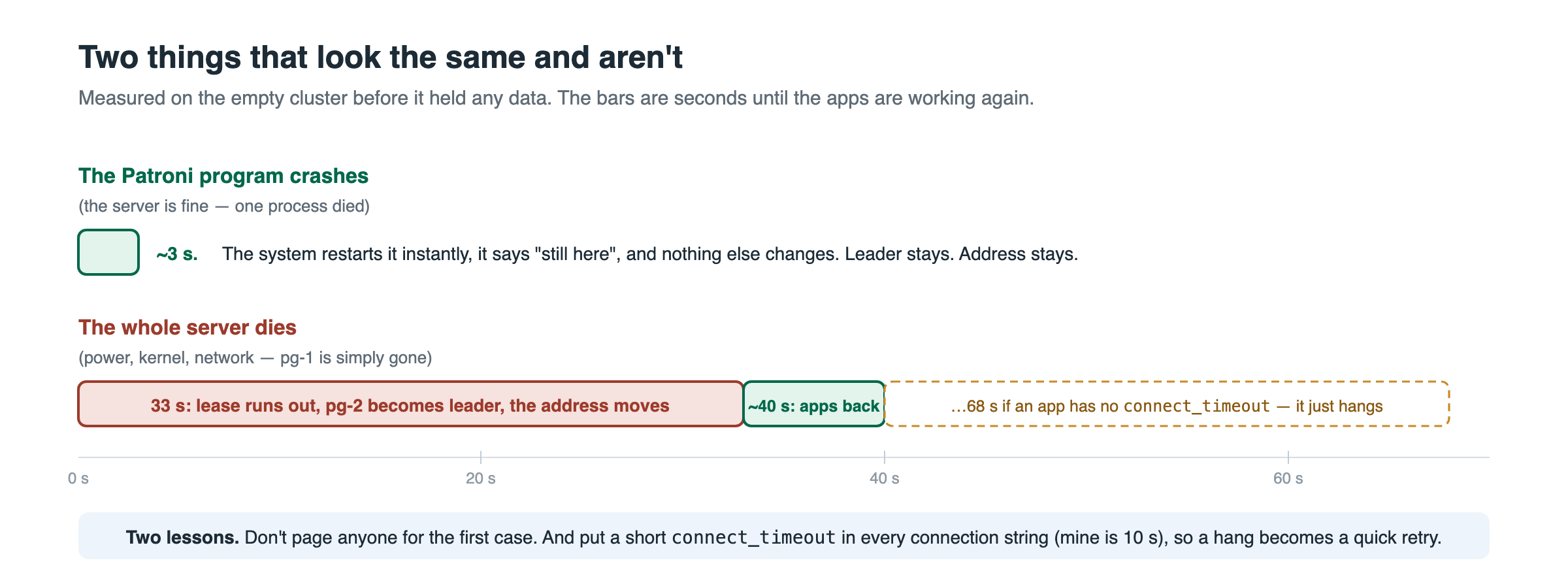
Drill 2 also produced the connect_timeout lesson: a client without one retried the dead address with exponential backoff (1, 2, 4, 8, 16, 32 s) and the retry that would have worked landed just after the switch, at 68 seconds. Every connection string now carries connect_timeout=10.
Also grow a Volume online once (resize in the API, then resize2fs) so you know the primary never stops. Mine went from 100 to 110 GB and stayed there.
Step 12: Move the data Link to heading
The copy is the easy part: 5 GB restores in minutes. The rule is that nobody writes to the old database after the dump starts, and nobody writes to the new one before the restore finishes.
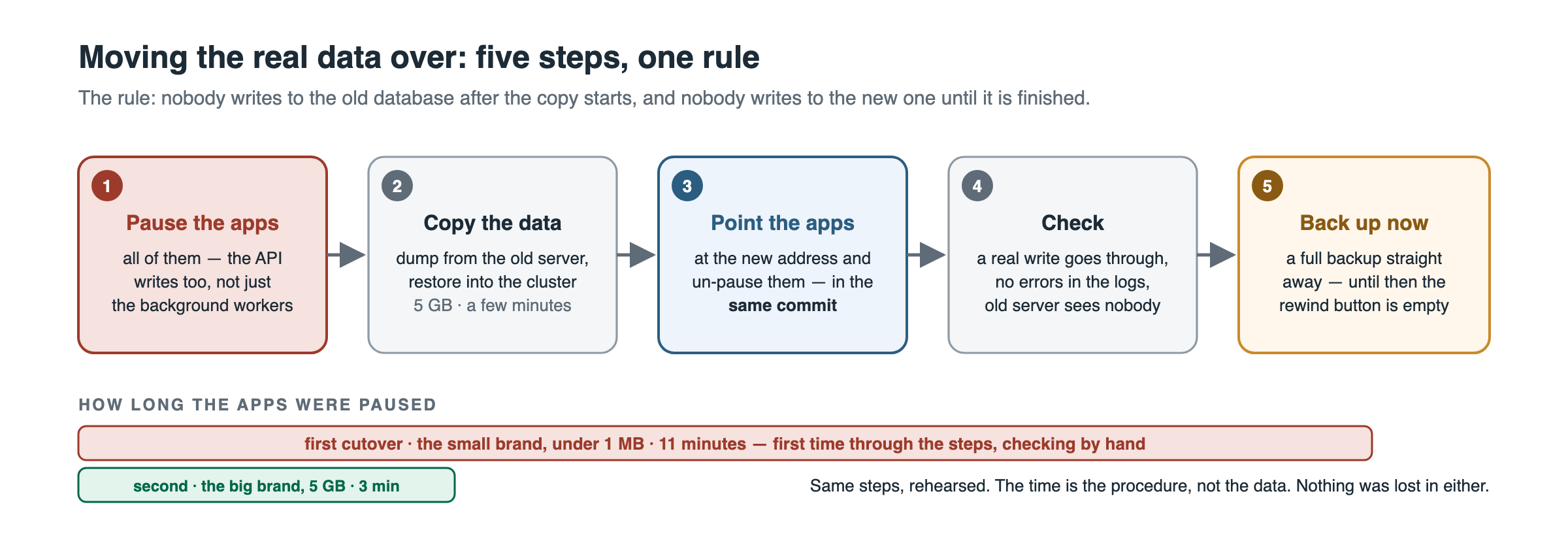
Pause every writer, including the API, not just the workers. Our deployments are GitOps-managed with self-heal, so a manual
kubectl scaleis reverted within minutes; the pause is a commit (replicaCount: 0) and so is the un-pause.Copy:
pg_dumpall --globals-onlypluspg_dump -Fcper database on the old server,pg_restore -j 4into the new leader. Sequences come with the dump; verify row counts andSELECT last_valueon the busiest sequences afterwards.Repoint in the same commit that un-pauses. Application URL through the pooler, with a pool cap and timeouts, and a direct URL for migrations:
DATABASE_URL=postgresql://appuser:<pw>@10.0.0.61:6432/appdb?connection_limit=10&pool_timeout=10&connect_timeout=10 DIRECT_URL=postgresql://appuser:<pw>@10.0.0.61:5432/appdb?connect_timeout=10connection_limitmatters: Prisma sizes its pool fromos.cpus(), which inside a container reports the host’s cores, so each pod would otherwise open 33 connections.Verify a real write end to end, then run
pgbackrest infoto confirm WAL is archiving from the new leader.Take a full backup immediately. Point-in-time recovery on the new cluster starts at the first full backup, not at “tonight”.
Fence the old database:
REVOKE CONNECTand terminate its backends, so nothing can write there by accident. Snapshot the server, then delete it.
My two cutovers took 11 minutes (the first, checking every step by hand) and 3 minutes (the second, rehearsed). The time is the procedure, not the data.
Day-to-day operations Link to heading
# where is everything
patronictl -c /etc/patroni/config.yml list

# patch a node: move the leader away, patch, move back
patronictl -c /etc/patroni/config.yml switchover pg-ha --leader pg-1 --candidate pg-2

# change a Postgres or Patroni setting cluster-wide (stored in etcd, applied by both nodes)
patronictl -c /etc/patroni/config.yml edit-config pg-ha

# rebuild a replica that has diverged
patronictl -c /etc/patroni/config.yml reinit pg-ha pg-2

# who is connected, and from where
psql -c "select client_addr, usename, count(*) from pg_stat_activity where backend_type='client backend' group by 1,2"
Read-only access for people, without touching the application role. Group role with the grants, one login role per person, pg_hba line on the group:
CREATE ROLE appdb_ro NOLOGIN;
GRANT CONNECT ON DATABASE appdb TO appdb_ro;
GRANT USAGE ON SCHEMA public TO appdb_ro;
GRANT SELECT ON ALL TABLES IN SCHEMA public TO appdb_ro;
ALTER DEFAULT PRIVILEGES FOR ROLE appuser IN SCHEMA public GRANT SELECT ON TABLES TO appdb_ro;
CREATE ROLE jane LOGIN PASSWORD '<pw>' IN ROLE appdb_ro;   -- the pg_hba +appdb_ro line already admits her
ALTER DEFAULT PRIVILEGES FOR ROLE appuser is the line people forget: it covers tables the application creates next month, and it must name the owner role.
Gotchas, in the order I hit them Link to heading
- Automatic updates restart databases. Disable them before installing anything.
- Patroni’s REST API listens on the private address, not localhost. Scripts that ask
127.0.0.1:8008get refused and may “succeed” by doing nothing. - Patroni owns its
pgpassfile. Give it a dedicated one. pg_hbais per database and per role. Use+grouplines so new users need no edit.repo1-s3-uri-style=pathfor Hetzner Object Storage.- Never load-test the pool production is using. A 25-second stress test held every real connection and failed two customer requests.
- A TCP load balancer never hangs up for you. Restart the pooler on demotion (Step 7).
- PgBouncer ships with
Restart=no, and the balancer cannot see it die. Drop-in, probe, alert (Step 6). .pgpassis keyed by host. Moving the database broke every pgAdmin entry silently; nothing reached the server logs because the client never sent anything.- Retire all of a design. After replacing a floating IP with the balancer, the old address was still configured on both nodes days later. And never
netplan applyon a live database node:ip addr delfor the running state, edit the file for the next boot.
If you would rather not type all of this, the whole procedure is automated, tested in CI and open source in hetzner-postgres-ha.